


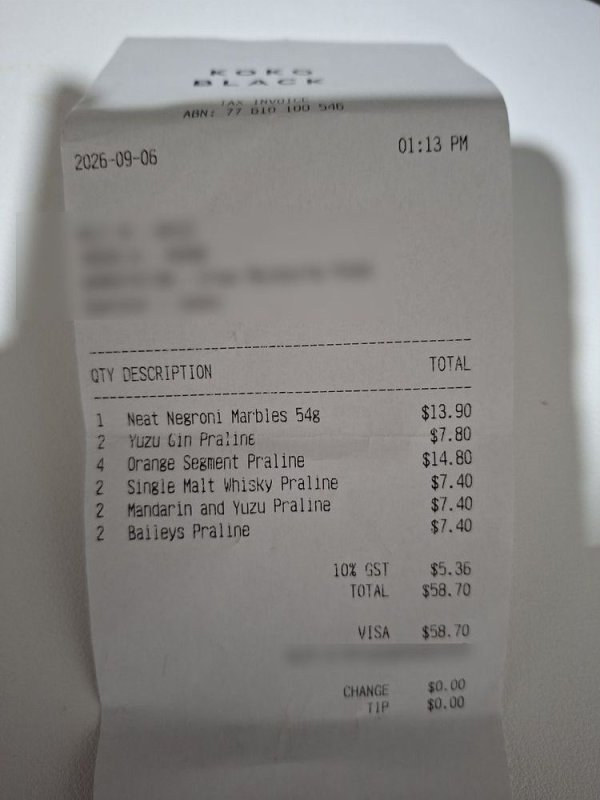
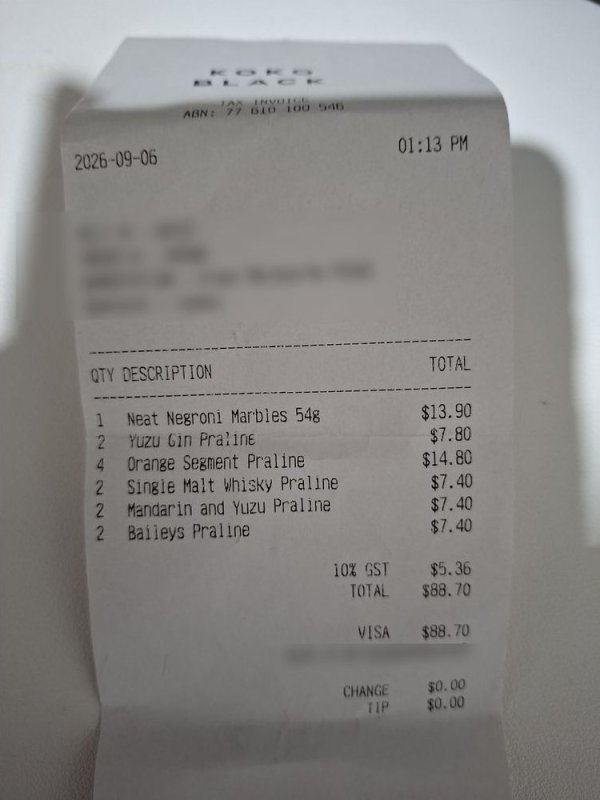
A photo of one of our own receipts. We made a copy and changed one digit of the total, then checked both files.


What changed
- The total. One digit, copied from elsewhere on the same receipt. By eye, the copy is hard to fault.
- What saved the file. The genuine photo's compression settings match the phone's camera. The copy's belong to editing software.
- The phone's own records. The genuine photo carries them after the image. The copy has none.
What the report said: Authenticity B for both. The originality assessment moved from Consistent with original to Inconclusive.

The report shows the file was saved again by software after the camera. It doesn't show which number changed. The receipt does: GST is still $5.36. GST is one eleventh of a total that includes it: about $5.34 on $58.70, but about $8.07 on $88.70.
Updated 14 November 2026
Our first edited copy was lost, so we made the same edit again from the original photo and ran both files. Both still grade B. Reports now include evidence maps.
- Regions boxes areas that match another part of the photo. On both files the boxes sit around the edges of the paper. None is on the total.
- Save history appears only on the copy, because it was saved twice. Its colour is spread over the middle of the receipt, not on the total.
The maps don't find the changed digit. The GST still does.
Go deeper
- How to check one yourself: Is this receipt, screenshot or certificate fake?
- Why it works: How to tell if a photo has been edited, by Kenneth Springer
- Try it on your own photo
Tagged
edited-photos


