


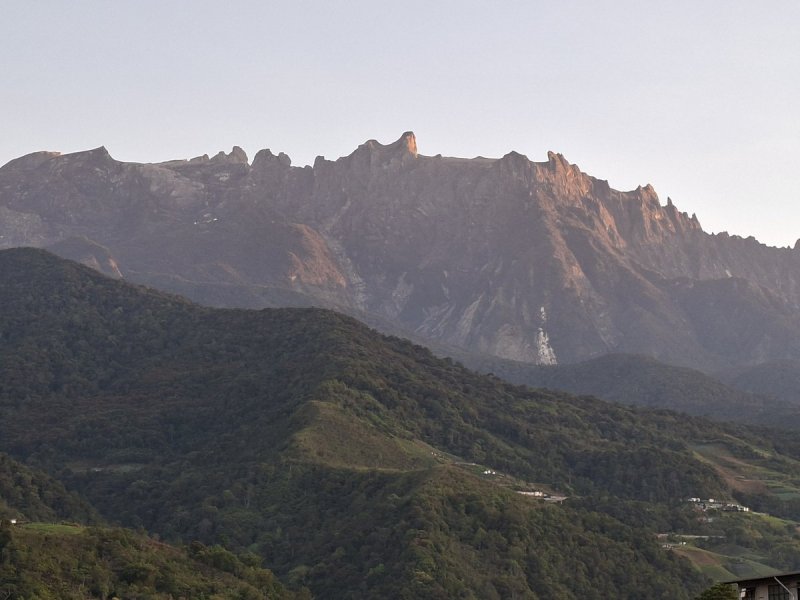
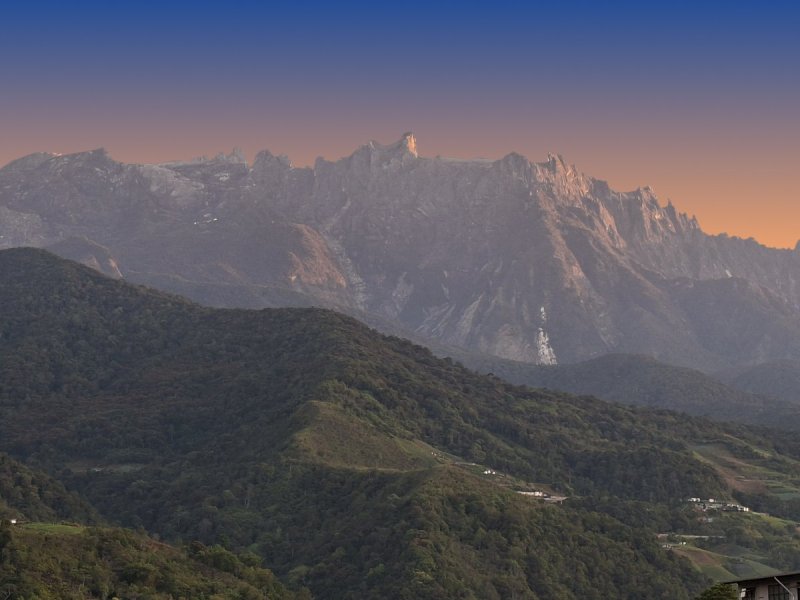
Mount Kinabalu at dawn, taken on an Android phone. We replaced the pale sky with a coloured one and saved the copy with the file's original details kept, the way many photo editors do.


What changed
- The sky. Everything below the ridge is untouched.
- The thumbnail didn't. The phone stored a small preview inside the file when the photo was taken. Our saved copy kept it, pale sky and all.
- What saved the file. The copy's compression matches common software, not the phone.
What the report said: Authenticity A for the original, B for the edited copy. It showed the thumbnail it found and flagged that it no longer matched the picture.

Updated 14 November 2026
We ran both files again. The grades are the same: A, then B. The report now puts the camera's preview beside the photo, in the Since the camera tab of its evidence maps.

- The photo now has the coloured sky.
- The camera's preview, stored when the photo was taken, still has the pale one.
- The report says they don't match, and that this can also happen when an app crops or rotates a photo. Here you can see the difference for yourself.
Go deeper
- How to check one yourself: Has this photo been edited?
- Why it works: The EXIF thumbnail that gave the edit away, by Kenneth Springer
- Try it on your own photo
Tagged
edited-photos


