


For phones
Share to snapWONDERS
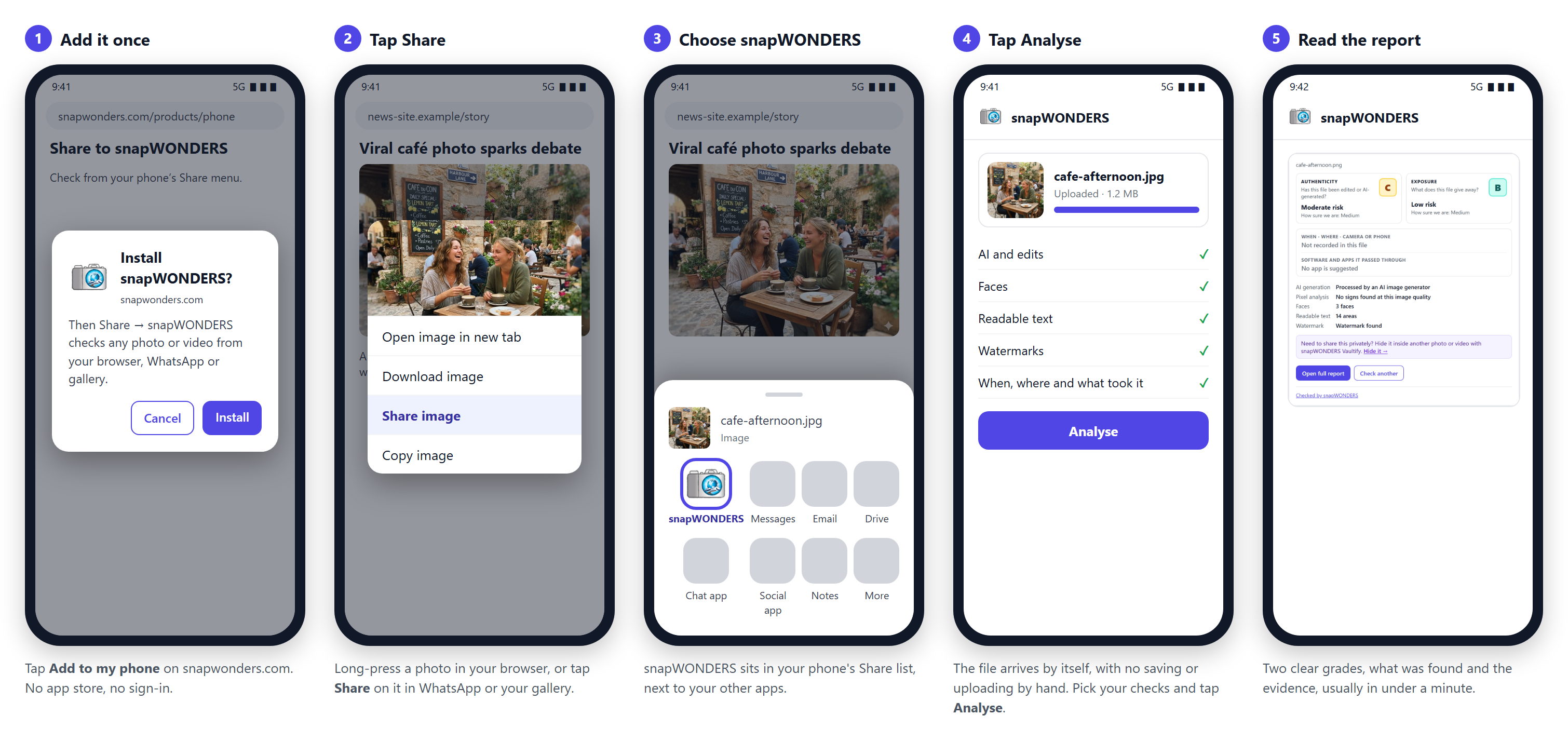
Check from your phone’s Share menu
Is that photo real? Long-press any photo or video, tap Share and choose snapWONDERS, from your browser, WhatsApp or your gallery. The forensic checks tell you: was it edited, was it made by AI, and what does it give away? Free, with no account needed.
Android: available now, added from your browser in one tap.iPhone: coming soon.
Add snapWONDERS to your phone
Then Share → snapWONDERS checks any photo or video from any app.
snapWONDERS is on this phone
Open any photo or video, tap Share, then snapWONDERS. The first time, it can take a minute to appear in the list, and it may be further down.
Add it from the browser menu
In Chrome, tap the ⋮ menu, then Add to Home screen or Install app. Samsung Internet: ☰ menu, Add page to, Home screen.
Open this page in Chrome first
You are reading this inside another app, which cannot add snapWONDERS to your phone.
iPhone: coming soon
Share to snapWONDERS is coming to iPhone. Until then, open snapwonders.com and upload the photo or video for the same checks and report.
On a computer?

On your Android phone: point the camera at this code to open this page there, then add Share to snapWONDERS.
On this computer: check any image or video with a right-click, using the snapWONDERS browser extension.
Android Available now
Add snapWONDERS to your home screen once: one tap, no app store, no sign-in. From then on it is in your Share menu. No saving, no copying, no uploading by hand.
The Android robot is reproduced or modified from work created and shared by Google and used according to terms described in the Creative Commons 3.0 Attribution License. Android is a trademark of Google LLC. iPhone is a trademark of Apple Inc., registered in the U.S. and other countries.
Busy? It finds you
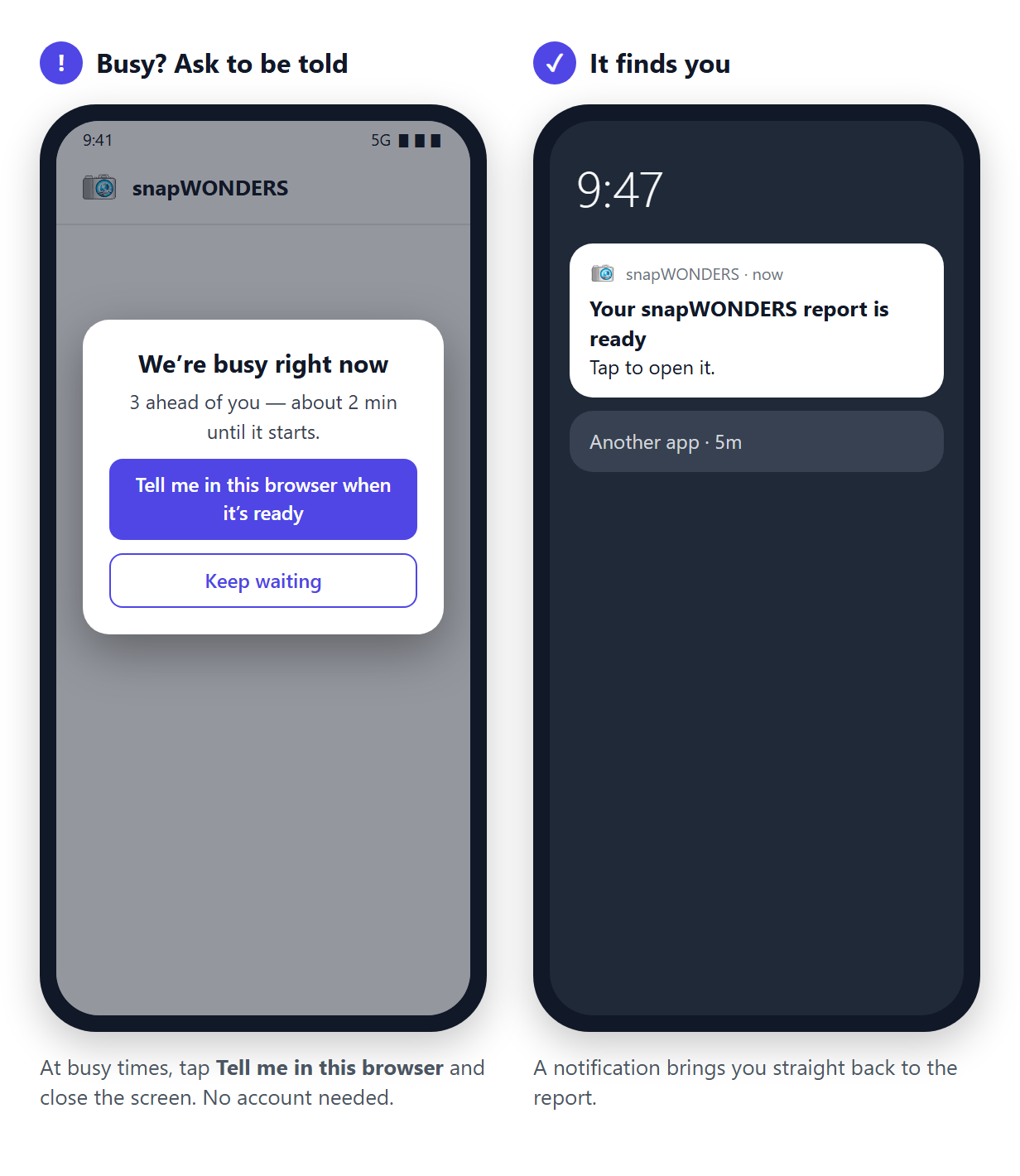
When lots of people are checking at once, your check waits its turn and carries on without you. Tap Tell me in this browser, close the screen, and a notification brings you back as soon as the report is ready. No account needed.
Signed in? You can have the report emailed to you as well.
iPhone Coming soon
Share to snapWONDERS is coming to iPhone. Until then, open snapwonders.com and upload the photo or video for the same checks and report.
Check a file now →Good to know
- Messaging apps often send a smaller copy without its details. For the full when, where and what, share the original from your gallery.
- Instagram and some other apps share a link, not the photo. Save the photo first, then share it from your gallery.
- Works in Chrome, Samsung Internet, Edge and Opera on Android. Firefox on Android cannot add sites to the Share menu.
- Your report is private: only someone with its link can open it, and it is removed when its time is up.
Free to start
- The same checks and the same free limits as the website. No sign-in.
- Sign in to keep your reports in My jobs and have them emailed when we are busy.
On a computer?
Share to snapWONDERS is for phones. On a computer, the snapWONDERS browser extension checks any image or video with a right-click, and this website checks any file you upload.

