Generated images are now good enough that looking hard at the hands is no longer a reliable test. The better question is not "does this look fake?" but "does this file behave like a photo that came out of a camera?"
1. Look for a label from the tool that made it
Many image generators now attach a provenance label (called Content Credentials, or C2PA): a signed record inside the file saying that it was generated and who signed that statement. If one is present, it is the clearest answer you'll get, and a check verifies the signature and shows it.
Its absence proves nothing. The label is easily lost when an image is screenshotted, re-saved or uploaded to a social platform.
2. Check for an invisible watermark
Some generators also hide a watermark in the pixels themselves, invisible to the eye. snapWONDERS scans for the known open watermark patterns. Some companies use watermarks that only their own tools can read, and no outside check can see those, so "no watermark found" is not an all-clear either.
3. Look for what a camera would have left behind
A photo from a phone records the device, the lens, the exposure and the moment it was taken, and it carries the particular kind of sensor noise real cameras produce. A generated image starts with none of that. No camera details plus no sensor noise is a stronger signal than either on its own.
Be careful: many apps strip camera details from genuine photos too, so "no camera details" alone is weak evidence.
4. Look at the picture itself
Still worth checking by eye: garbled or inconsistent text and signs, jewellery, fences, hair and fingers that merge into each other, lighting that is too perfect, and backgrounds that dissolve into texture instead of real objects. Newer tools make fewer of these mistakes, so treat them as clues.
5. Run a check
Upload the image to snapWONDERS. The report reads any provenance label, scans for known watermarks, checks the file's details for an AI declaration, and runs a pixel analysis on the image itself. It then gives the image an AI-generation card:
- A, Verified Camera Capture, only when signed Content Credentials from a trusted signer show the camera capture as the last step.
- B, Real Capture, Edited, when the signed history starts with a real capture and was edited without AI.
- C, No AI-Generation Evidence Found, when nothing points either way. That is not a finding that the photo is real. Most genuine photos land here.
- C, Inconclusive, when something turned up that can't settle it alone.
- D, when there is AI evidence, with a label saying what it was, and F, AI-Generated (Certified) for a signed AI declaration from a trusted signer.
The pixel analysis line under the card reads "signs of AI generation detected", "no signs found", or "not yet calibrated" for that kind of file. It can't grade the card on its own: a flag rules out an A or a B and leaves the card at C "Inconclusive". It catches most images from older AI tools but can miss many from the newest ones, and wrongly flags fewer than one in a hundred ordinary camera photos. Very plain scenes, like a bare wall or an empty sky, are more often misread. The "no signs found" line says it can miss newer AI tools, and a low reading is never proof that a photo is real.
A table below the card lists each check, what it found and how strongly it counted. How to read your report explains the card and the table in full.
A worked example: one real field, one generated
We checked three files: a photo of canola fields we took ourselves, an image of canola fields we asked Google's Gemini to generate (downloaded as the original file), and a screenshot of that Gemini image.

We checked all three again on 15 October 2026:

-
The Gemini original carries Content Credentials signed by Google, declaring it AI-generated. The report verifies the signature, the AI-generation card reads F, AI-Generated (Certified), and the image grades Authenticity F. The Content Credentials section leads with the last signed step:
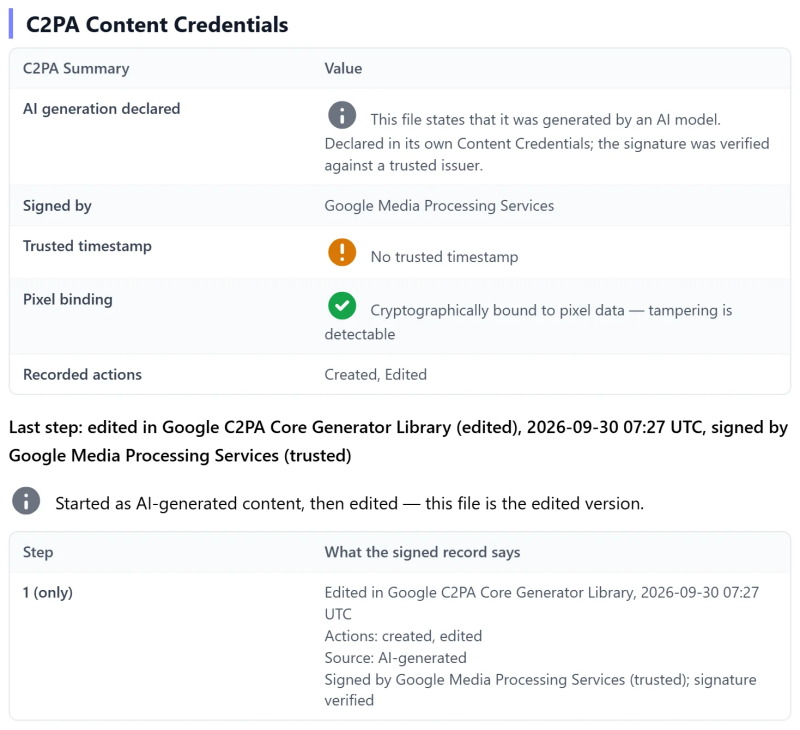
-
The screenshot is the same picture with the label gone. Its card reads C, No AI-Generation Evidence Found, with a statistical estimate of 18%, a weak reading. The pixel analysis found no signs.
-
Our real photo also reads C, No AI-Generation Evidence Found: a 1% estimate, and the pixel analysis found no signs. It records the phone that took it.

Only the label told the generated image apart. The pixel analysis found no signs in the screenshot or in the Gemini original, where the label had already settled it. No watermark was found in any of the three: Google says Gemini images also carry its SynthID watermark, which only Google's own tools can read.
When we first checked these files in September 2026, the report put the statistical estimate forward as its verdict: 21% for the screenshot and 15% for our photo, both called "likely authentic". It no longer does. The estimate is now a weak line in the evidence table, and a file with no AI evidence gets C "No AI-Generation Evidence Found".
That is why this guide starts with the label, and why a C on the AI-generation card is not an all-clear.
See it as a before and after: our photo of canola fields, or Gemini's?
Why a missing label proves little: our AI image lost its label on LinkedIn, Mastodon and X.
Reading the result honestly
- No check is certain. Treat the AI-generation card as one piece of evidence, weighed with where the image came from and who sent it.
- "No AI-Generation Evidence Found" is not "real". It means nothing pointed either way. Only signed Content Credentials can show a verified camera capture.
- Edited is not the same as generated. A real photo retouched with AI tools can show some of the same signs.
- Where did it come from? An image that first appeared on an anonymous account, with no earlier copy and no camera details, deserves more doubt than one sent by the person who took it.
Why this works
Kenneth Springer explains two of the underlying checks in What C2PA Content Credentials prove and Detecting AI-generated images without AI.
Related guides
More guides on